
Facebook is one of the World largest social utility networking site that connects more than One Million people with their Friends, Family, colleagues, etc. most of the people are on Facebook to keep up their connectivity with their loved ones. It has gained lots of response from the student’s worldwide. Every student is on Facebook, and they are connected to their friends all the time by posting & sharing their Status Updates, Pictures, Check-in’s etc. There are many Facebook addicts, who are available on facebook right from the Dawn to Dusk. Facebook has become their ultimate life and they do not wish to come out of it. There are another set of facebook addicts, who wanted to come out of Facebook. This post is for those Facebook Addicted peers, who wish to (Take Off) from Facebook for a time being. And we will help them on How To Delete Facebook Account Permanently or De-Active Temporarily.
See: Add Photos To Comments In Facebook
We surely cannot run away from Facebook, because it not only is used for Just Time pass. It’s also very useful for many people in promoting their Business, Their Blogs, Finding Clients Online, Finding Jobs on Facebook, etc. It has become an informative & very useful place, where we have to be in order to get benefited. But majority of people who wish to get rid of Facebook for time being can try one of the following two methods.
- Delete Facebook Account Permanently
- De-Active Facebook Account Temporarily
See: [How-To] Hide Your Facebook Friends List
How To Delete Facebook Account Permanently:
If you never wish to return back to Facebook and want to Delete your Facebook Account Permanently, then follow the Steps below
STEP 1: Login to your Facebook Account, & visit the “Profile Deletion Page”
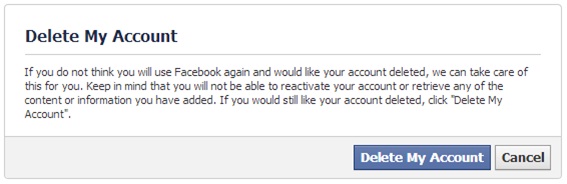
STEP 2: Click on “Delete My Account”
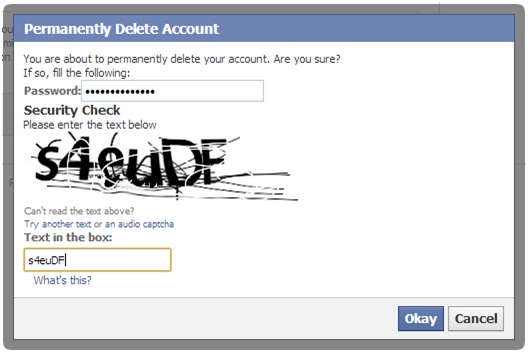
STEP 3: To confirm Permanently Delete Account. “Enter Your Passowrd” & Type the “Capcha” and then Press “Okay”
STEP 4: That’s it; you are done Deleting Facebook Account Permanently.
Note: If you change your mind and wish to return back to Facebook. Then simply by logging in you can recover back your Facebook Account. If you do not, login since 14 days, then your account gets deleted permanently & all your Data on Facebook is also deleted from Facebook Database Permanently.
See : 7 Tips To Avoid Facebook Hack [How-To]
How To De-Active Facebook Account Temporarily:
If you wish to return back to Facebook again after some period of time and want to De-Active Facebook Account Temporarily, then follow the Steps below
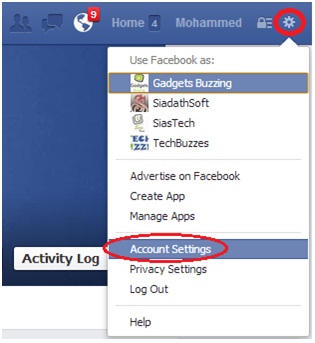
STEP 1: Login to your Facebook account and select “Account Settings” from the Menu.
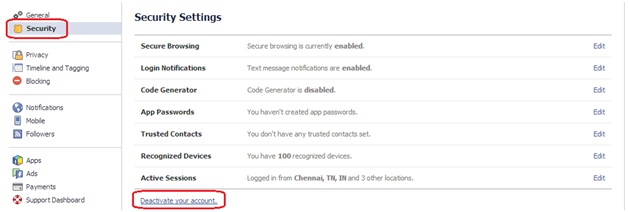
STEP 2: Click on “Security” option, and then select “Deactivate your account”
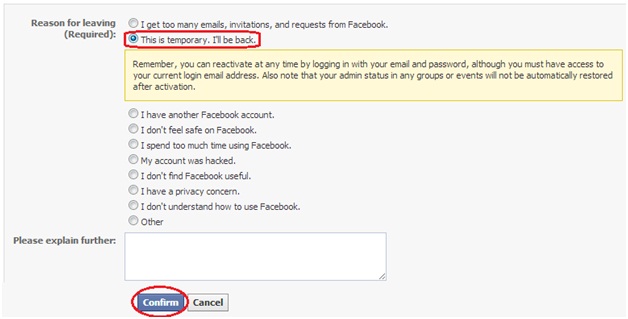
STEP 3: Now select one option from “Reason For Leaving” and then click on “Confirm”
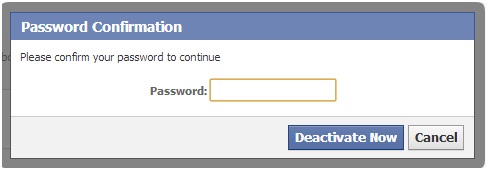
STEP 4: Enter your Account Password and then Click on “Deactivate Now”.
STEP 5: That’s it; you are done De-Activating Facebook Account Temporarily.
Note: Your Account is Deactivated Temporarily; and you may get access to your account or recover your account anytime.
See: Download & Upload all your Photos on Facebook with Drop N Sync
